Ask any IT manager what happens during an audit, and you’ll hear some version of the same story: the spreadsheet says one thing, the storage room says another, and somebody spends three days trying to find out why.
RFID asset tracking exists to close that gap. Not with more spreadsheets. With tags that get scanned automatically, in seconds, without anyone walking around with a clipboard.
Key Takeaways
- RFID closes audit gaps by automatically scanning entire rooms in seconds to catch missing assets and reconcile inventory without manual work.
- Use RFID when you have 100+ assets spread across locations. For smaller single-location setups, barcode scanning is usually enough.
- Test RFID tags on your actual equipment first because metal in servers and laptops interferes with signals. On-metal tags are required for servers.
- RFID only works if the software connects to your CMDB or ITSM tool and updates records automatically. Tracking without integration just creates extra work.
Here’s what it actually is, how it works, and where it fits (or doesn’t) for an IT team.
What Is RFID Asset Tracking?
RFID asset tracking uses small radio tags to identify and locate equipment automatically. No barcode to line up. No manual scan of every single item.
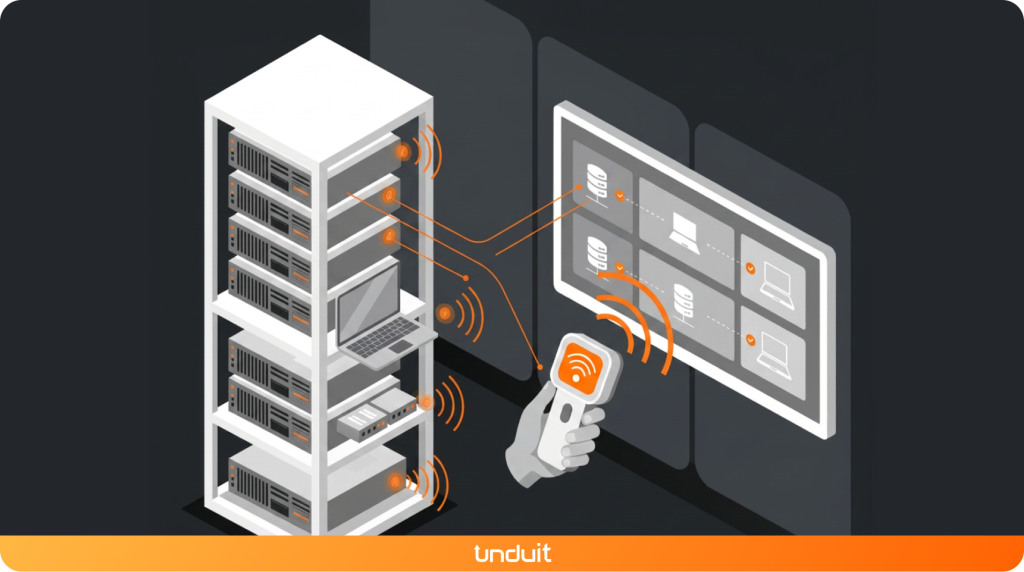
A basic setup has three pieces:
- Tags attached to each laptop, server, or piece of equipment
- Readers handheld or fixed devices that pick up the tag’s signal
- Software where the reads land, get matched to asset records, and turn into something useful
The reader doesn’t need to “see” the tag the way a barcode scanner does. It just needs to be in range. That one detail is why RFID can scan a whole rack, cabinet, or room in one pass instead of one item at a time.
How Does RFID Asset Tracking Work?
Picture a laptop moving through its normal life in your company:
- It gets tagged in the stockroom and linked to an asset record.
- A reader at the exit picks it up the moment it leaves, so the system knows it’s checked out.
- It gets assigned to an employee, and that record updates automatically.
- When it’s returned, another read logs it back into inventory; no one has to type anything in by hand.
Every step creates a timestamped record. That’s the part spreadsheets can’t do: RFID builds a history, not just a snapshot.
Active vs. Passive RFID Tags for IT Assets
Not all RFID tags work the same way, and picking the wrong type is the most common mistake teams make early on.
Passive tags:
- Have no battery; they’re powered by the reader itself
- Cost a few cents to a few dollars each
- Work well for stockrooms, checkout points, and office equipment
- Shorter read range (usually a few feet)
Active tags:
- Have their own battery and broadcast constantly
- Cost more often $15 to $50+ per tag
- Better for real-time location tracking across large spaces
- Longer range, but bigger upfront investment
For most IT teams, passive tags cover 90% of use cases. Active tags make sense when you genuinely need to know where something is right now, not just where it was last scanned.
RFID vs. Barcode vs. GPS vs. BLE: Which Should IT Teams Use?
This is the question that trips people up, so here’s the short version.
| Technology | Best for | Limitation |
| Barcode | Small teams, low budget | Manual, one item at a time, needs line of sight |
| RFID | Offices, stockrooms, data centers | Limited range (a few feet to a few dozen feet) |
| GPS | Vehicles, outdoor equipment | Doesn’t work well indoors |
| BLE | Continuous indoor location tracking | Needs more infrastructure (beacons/anchors) |
If your assets mostly move between a stockroom, an office, and an employee’s desk, RFID is usually the sweet spot. It’s faster than barcode without the cost and complexity of GPS or BLE.
Tagging Laptops, Servers, and Network Equipment

IT equipment isn’t easy to tag. Metal is everywhere, and metal interferes with radio signals. Here’s how teams handle it in practice:
Laptops
- Metal inside the chassis (especially near the screen) can weaken the signal
- Metal-mount tags are built to work around this they use the metal itself to boost the read range instead of fighting it
Servers and racks
- On-metal tags are a must here, not optional
- Some teams tag down to the rack and U-position level, so a scan tells you exactly which slot a server is in, not just “somewhere in the data center”
Network equipment
- Switches, routers, and other dense, metal-heavy gear need the same on-metal approach
- Placement matters: a tag buried between two devices won’t read well, even if it’s the right type
The lesson here: test your tags on your actual equipment before ordering a few thousand of them. What works on a laptop won’t always work on a rack-mounted server.
What to Look for in RFID Asset Tracking Software
The tags and readers matter, but the software is what makes the data usable. A few things worth checking before you commit to a system:
- Does it connect to your CMDB or ITSM tool?
A scan that doesn’t update your existing records just creates a second system to maintain. - Does it flag exceptions automatically?
You want to know when something’s missing or in the wrong place, not have to go looking for it. - Is it cloud-based or on-prem?
Cloud is easier to roll out across multiple offices; on-prem gives you more control. - Can it scale with you?
A system that works for 200 assets should still work at 2,000.
Using RFID for IT Asset Audits and Compliance
This is where RFID earns its keep for most IT teams not the day-to-day tracking, but the moment someone asks, “Can you prove what you have?”
Ghost assets. These are the items still sitting on your books that don’t actually exist anymore, lost, stolen, or quietly disposed of without anyone updating the record. A quick RFID scan will surface these immediately, because anything that doesn’t get read shows up as missing.
Reconciliation. Instead of manually checking your register against what’s physically there, you scan a room and let the software flag the differences.
Compliance reporting. Auditors want proof, not promises. A read log with timestamps is a lot more convincing than “we’re pretty sure we have it.”
None of this replaces good asset management practice. It just makes the practice a lot less painful to keep up with.
Is RFID Right for Your IT Team?
RFID isn’t the right call for every team. A rough way to think about it:
- Under 100 assets, single location? Barcode is probably enough.
- Hundreds or thousands of assets, or spread across offices? RFID starts paying for itself fast, mostly in the time it saves during audits.
- Assets constantly moving between people, departments, or sites? This is where RFID makes the biggest difference the tracking happens without anyone stopping to scan anything by hand.
The honest answer for most growing IT teams: if you’re already dreading the next audit, that’s usually the sign.
Beyond Tracking: What Unduit Adds

RFID tracking solves one part of the problem knowing what you have and where it is. But knowing isn’t the same as managing.
Unduit takes it further. Instead of just tracking an asset, it manages the whole lifecycle around it procurement, deployment, recovery, repair, and disposal, all connected to the same record RFID keeps updated.
Most tracking tools stop at “here’s your data.” Unduit uses that data to actually run the process: flagging what needs to be recovered, routing repairs, and closing the loop when equipment is retired across 100+ countries, if that’s where your team is.
If accurate tracking is step one, Unduit is what happens with that information next.
Streamline IT Asset Management with Unduit
Automate requests, manage assets, and deliver better IT support from one platform.
Get demoFAQs
Q1: What is RFID IT asset tracking?
It’s the use of RFID tags and readers to automatically identify and track IT equipment like laptops, servers, and network gear, without manual scanning.
Q2: How does RFID asset tracking work?
A tag is attached to an asset and linked to its record. Readers pick up the tag’s signal as it moves past checkpoints or gets scanned, updating its location and status automatically.
Q3: Is RFID better than barcode for asset tracking?
For small, single-location setups, barcode is often enough. For larger, distributed teams, RFID saves time because it doesn’t need line-of-sight scanning and can read multiple items at once.
Q4: How is RFID tracked?
A reader sends out a radio signal. Any tag within range picks it up and sends back its ID, no button-pressing or lineup needed. The reader logs that read which tag, where, and when and passes it to the software, which updates the asset’s record.
Q5: How far away can RFID be detected?
It depends on the tag. Passive tags usually read from a few inches up to about 15-20 feet. Active tags, since they carry their own battery, can be picked up from 100 feet or more. Metal, liquid, and dense equipment can shorten these ranges in real-world conditions.
Q6: What are the disadvantages of using RFID?
- Costs more upfront than barcode tags; readers and software all add up
- Metal and liquid can interfere with the signal, especially with passive tags
- Readers can pick up tags you didn’t mean to scan if zones aren’t set up carefully
- Takes some testing to get right; it’s not as plug-and-play as a barcode scanner