Your best sales rep can’t log in. Your finance lead is stuck on a broken VPN on the morning invoices are due. Your new hire in another city can’t get their laptop set up before their first meeting. None of these people are near an office, and none of them can wait for someone to drive over.
This is the reality of hybrid and remote work. Teams are spread across cities, time zones, and home networks, but the expectation for IT response hasn’t slowed down at all. That’s where remote IT support comes in.
Key Takeaways
- Remote IT support enables faster issue resolution without on-site technician visits.
- Businesses reduce downtime and costs with reliable remote assistance.
- Secure remote support requires strong access controls and compliance measures.
- The right provider depends on your team size, devices, and support needs.
Remote IT support is the practice of diagnosing and fixing technology issues over the internet, without a technician physically present. A support specialist connects to your device, sees what you see, and resolves the problem in real time.
What Is Remote IT Support?
It’s technical help delivered through a remote connection instead of an in-person visit. A technician accesses your computer or network remotely, walks through the issue, and applies a fix, all while you watch or continue working.
Compare that to on-site support, where someone travels to your location, plugs in, and works on the machine directly. On-site support still matters, but for the vast majority of day-to-day issues, remote support gets the job done faster and without a travel bill.
You’ll see a few terms used almost interchangeably: remote support, remote support service, and remote service. They all point to the same idea, help that doesn’t require a technician in the room.
Businesses lean on remote IT support for:
- Everyday incidents (a frozen app, a login error, a slow machine)
- Routine maintenance and patching
- Onboarding new employees and setting up their devices
- Device troubleshooting, from laptops to printers
- Access and permission issues
How Remote IT Support Works
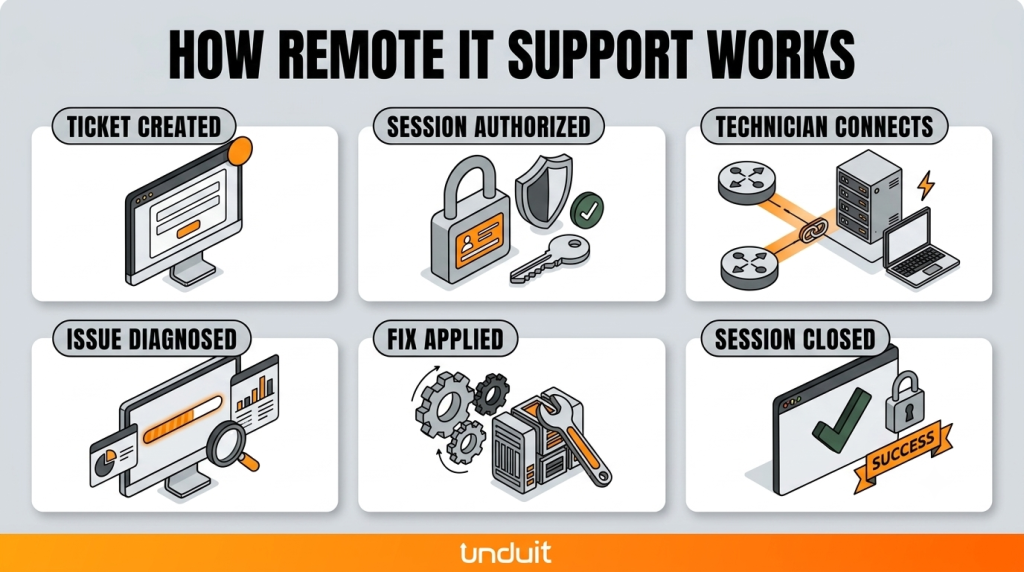
The process is more straightforward than people expect. Here’s what a typical session looks like:
- A ticket comes in. An employee reports an issue through email, a portal, or a phone call.
- The session is authorized. The user grants permission for the technician to connect. Nothing happens without this step.
- The technician connects. Using remote desktop or remote assistance software, the technician views the screen and takes control if needed.
- The issue is diagnosed. The technician identifies the root cause as a corrupted file, a network setting, or an outdated driver.
- The fix is applied. Software is reinstalled, settings are corrected, and a device is reconfigured.
- The session is closed. The connection ends, and the ticket is documented for future reference.
There are two main connection methods worth knowing:
- Attended support: the user is present and approves the session in real time. Most everyday help desk calls work this way.
- Unattended access: the technician connects to a device without someone sitting at it, often used for after-hours maintenance or fixing an unattended office computer.
The tools that make this possible include remote desktop for IT support, remote assistance software, and broader remote support platforms that combine screen sharing, file transfer, and chat in one place. A good platform makes the six steps above feel almost invisible to the end user.
Core Services and Use Cases
Remote IT support services cover far more than “my computer is broken.” Here’s what shows up most often on a support queue:
- Password resets and account lockouts
- Software installs and updates
- Patching and security updates across devices
- Device troubleshooting (slow performance, crashes, connectivity)
- Printer and peripheral issues
- Endpoint management keeps every laptop, phone, and tablet secure and compliant
Many providers package these into remote help desk services, backed by remote help desk software that logs tickets, tracks resolution time, and flags recurring problems.
IT Support for Remote Workers and Hybrid Employees
A remote employee working from a home network doesn’t have an office IT closet down the hall. If their Wi-Fi drops or their VPN won’t connect, remote support is often the only realistic option. The same goes for hybrid employees who split time between home and office; their support needs shift depending on where they’re logging in from.
This extends to contractors and branch offices too. A contractor using their own device still needs secure access to company systems. A branch office with two employees doesn’t justify a full-time on-site technician, but it absolutely needs fast, reliable help when something breaks.
Benefits of Remote IT Support for Businesses
The benefits of remote support are easy to see once you compare it to waiting for someone to show up in person:
- Reduced downtime. Issues get resolved in minutes, not hours.
- Lower support costs. No travel time, no mileage, no scheduling delays.
- Faster resolution. A technician can jump between tickets back-to-back instead of driving between sites.
- Scalability. One remote support team can cover ten locations as easily as one.
- Wider coverage. Support isn’t limited by geography or time zone in the same way.
Downtime isn’t a minor inconvenience; it’s a real cost.
Research from Gartner put the average cost of IT downtime at $5,600 per minute, and even conservative estimates for small businesses land in the hundreds of dollars per minute. Fast remote response is one of the most direct ways to keep that number down.
Remote IT Support for Small Business
Small businesses often can’t justify a full in-house IT department, but they still need reliable coverage. Remote IT support for small business fills that gap. You get expert help on demand, priced to match your size, without the overhead of a full-time hire.
That said, remote support isn’t a fit for everything. Physical repairs, new hardware installation, and cabling issues still need someone on-site. The smartest setups combine both: remote support for daily issues, on-site visits for the exceptions.
Security and Compliance
This is where a lot of remote support conversations fall short, and it’s worth slowing down here.
Any tool that lets someone access your systems remotely needs to be locked down properly. At minimum, look for:
- Access controls that limit what a technician can see and do
- Multi-factor authentication (MFA) on every login
- Encryption for data in transit during a session
- Logging of every connection and action taken
- Session recording so there’s a record of exactly what happened
When you’re choosing secure remote support tools, ask vendors directly how they handle each of these. If they can’t give you a clear answer, that’s a red flag.
Regulated industries, such as healthcare, finance, and legal, have additional obligations. You’ll need remote support software that supports audit trails and meets the specific compliance standards your industry requires (HIPAA, SOC 2, and similar frameworks, depending on your sector).
Don’t assume a general-purpose tool checks these boxes. Ask, and get it in writing.
Remote Support Software and Tools
Not all remote support software works the same way. Here’s how the major categories break down:
When evaluating remote IT support software or looking for the best remote IT support software for your team, weigh these factors:
- Security: encryption, access controls, compliance support
- Latency: how responsive the connection feels in real use
- Ease of deployment: how quickly you can roll it out across your devices
- Integrations: does it connect with your existing helpdesk and ticketing system
- Governance: can you control who has access to what
- Pricing: does the cost structure match how your team actually works
Pricing and Buying Guide
Remote IT support pricing usually follows one of a few models:
- Per technician: a flat fee for each support agent using the tool
- Per device: priced based on how many endpoints you’re covering
- Per session: pay only when support is actually used
- Bundled: remote access included as part of a broader help desk software package
For small businesses, per-session or bundled pricing often makes the most sense, since it scales with actual usage. Enterprise buyers tend to lean toward per-device pricing, since it’s easier to budget across large device fleets.
How to Choose the Right Provider
Not every remote IT support company is the right fit for every business. Use this framework to narrow it down:
- Business size: a five-person team and a 500-person company need very different support models
- Device count: more devices mean you need stronger endpoint management and monitoring
- Compliance needs: regulated industries need providers who can prove their security posture
- Support hours: does the provider match your actual working hours, including time zones
Unduit’s Approach to Remote IT Support
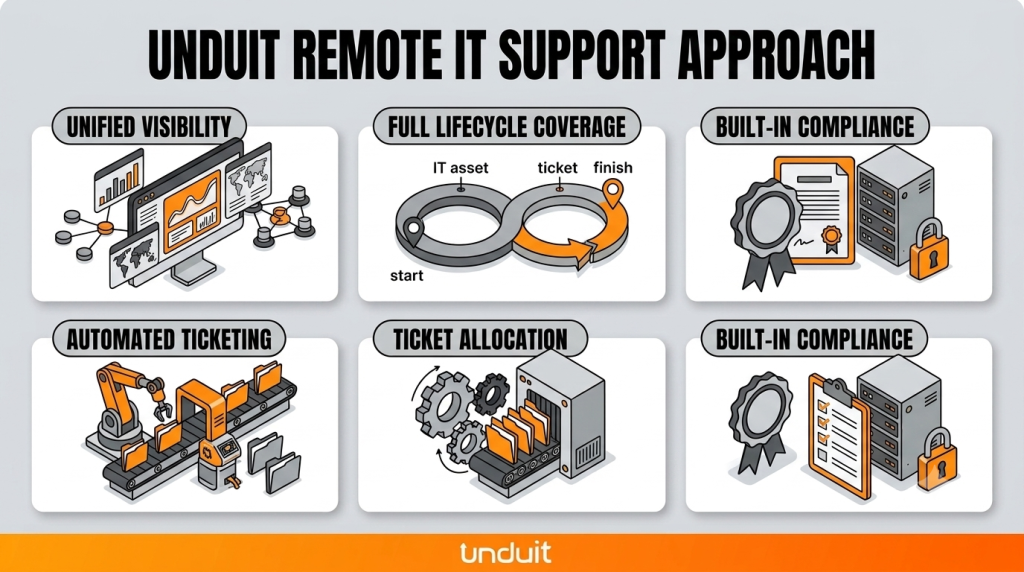
Most friction in remote IT support comes from asset data and service tickets living in two separate systems that don’t talk to each other. Unduit closes that gap by running ITAM and ITSM on a single platform, so a technician working on a ticket already has the full device context in front of them.
- Unified visibility: device history, ownership, and status appear directly inside the ticket, no switching tools
- Full lifecycle coverage: procurement, deployment, recovery, resale, and recycling handled across a global footprint
- Automated ticketing: intake, triage, and routing happen without requests getting lost between email, chat, and portals
- Built-in compliance: every device action leaves a documented chain of custody, supporting standards like HIPAA, PCI, and GDPR
Streamline IT Service Management with Unduit
Automate requests, manage assets, and deliver better IT support from one platform.
Get demoFAQs
How much does remote IT support cost?
It depends on the pricing model and your business size, but expect per-session, per-device, or per-technician pricing, often bundled with broader help desk software.
What is the best remote IT support?
The right choice depends on your business size, compliance needs, and support hours there’s no single “best” provider for everyone.
How to hire remote workers for IT support roles?
Look for strong troubleshooting skills, clear communication, and experience with ticketing and endpoint management tools, then verify with a practical technical assessment.
What is the best remote IT support software?
Look for options that balance security, ease of deployment, and integration with your existing helpdesk system rather than chasing a single “top” brand.
What is remote IT helpdesk support?
It’s a support model where tickets are logged, tracked, and resolved through a remote connection instead of in-person visits.
Which IT provider offers local and remote support?
Many managed IT providers offer both on-site and remote IT support coverage; ask directly about their coverage before signing.
How to start a remote IT support business?
Start with a clear service scope, secure remote access tools, a ticketing system, and a pricing model that matches the market you’re targeting.
What are the top remote IT support tools?
Look across attended, unattended, browser-based, and helpdesk-integrated categories, and choose based on your security and workflow needs rather than popularity alone.
What are the best remote IT support companies?
The best fit depends on your business size, industry compliance requirements, and support hours evaluate a few against the checklist above before deciding.