When a laptop or server reaches the end of its life, most people assume deleting the files or reformatting the drive takes care of it. It doesn’t. Deleted files are usually still recoverable with basic, freely available software. That gap is exactly why data erasure standards exist: documented, repeatable methods for overwriting or destroying data so it can’t be pulled back off a device, no matter who tries.
Key Takeaways
- Deleting files isn’t the same as erasing them, recovery tools can usually retrieve deleted data unless it’s been properly overwritten or destroyed.
- NIST 800-88 is the practical default for most organizations today; DoD 5220.22-M is a legacy standard best suited to older hard drives; IEEE 2883 is the newest and most SSD-aware.
- Different devices need different erasure methods; SSDs, hard drives, mobile devices, and cloud storage don’t sanitize the same way.
- A certificate of data destruction turns “we erased it” into something that can actually be proven during an audit.
- Erasure works best when it’s built into the broader asset lifecycle, not treated as a disconnected final step.
This guide covers the three standards that matter most today NIST 800-88, DoD 5220.22-M, and IEEE 2883 what they actually require, how they compare, and how to think about erasure across a whole fleet of devices rather than one drive at a time.
What Are Data Erasure Standards?

A data erasure standard is a documented method for removing data from a storage device so it can’t be reconstructed. These methods, often referred to as media sanitization guidelines, are published by government bodies or standards organizations, and they spell out things like how a drive should be overwritten, what pattern to use, and how to confirm the process actually worked.
The point is consistency. Without a standard, “we wiped it” could mean anything from a quick format to a genuinely secure overwrite. With one, there’s a process someone can check and audit later.
Data Erasure vs. Data Destruction
These terms get used interchangeably, but they’re not the same thing.
- Data erasure overwrites data using software, following a defined standard. The device still works afterwards and can be reused or resold.
- Data destruction physically disables the device, shredding, crushing, or degaussing it so it can never be used again.
Neither is automatically the better choice. Erasure makes sense when hardware will be reused or resold. Destruction makes sense when a device is damaged, obsolete, or holding data sensitive enough that reuse isn’t worth the risk.
Data Erasure vs. Data Sanitization Standards
“Sanitization” is the broader term. NIST uses it as an umbrella covering three actions:
- Clear (basic overwriting for lower-risk situations)
- Purge (more rigorous methods that resist advanced recovery attempts)
- Destroy (physical destruction).
Erasure generally refers to the Clear and Purge levels of the software side of sanitization.
Why Data Erasure Compliance Matters
Improperly wiped devices are a recurring source of exposed data; researchers who buy used drives on the secondary market regularly find recoverable files still on them. For a business, that’s not just a reputational risk. Most data protection laws expect proof that data was actually removed, not just an assurance that it was.
A few regulations that touch on erasure or destruction directly:
- GDPR: Article 17 gives individuals the right to have their personal data erased, and that extends to any hardware storing it.
- HIPAA: Requires healthcare organizations to make patient data unreadable and unrecoverable when disposing of it.
- PCI-DSS: Requires secure disposal of media holding cardholder data.
- CCPA: Requires a defensible process for deleting consumer data on request.
- ISO 27001: Includes media sanitization among its information security controls.
- SOX: Requires financial records to be disposed of through documented, auditable procedures.
None of these laws specify exactly which erasure method to use. That’s where the technical standards below come in.
The Major Data Sanitization Standards
NIST 800-88 Data Erasure
NIST 800-88 is the standard most U.S. government agencies and much of the private sector rely on today. It defines the Clear, Purge, and Destroy categories, with guidance for hard drives, SSDs, and mobile devices, including when cryptographic erasure can replace a full overwrite.
DoD 5220.22-M Standard
The Department of Defense standard dates back to 1995 and was, for a long time, the default reference point for secure wiping. It’s best known for its three-pass and seven-pass overwrite methods, which write specific patterns over a drive multiple times. It was built for the hard drives of its era. Solid-state drives don’t behave the same way mechanically, and repeated overwrite passes can wear an SSD down without adding meaningful security.
IEEE 2883 Data Sanitization
IEEE 2883 is the newest of the three, published by the IEEE Standards Association and referenced directly inside the current version of NIST 800-88. It was written with modern storage in mind from the start: SSDs, flash memory, hybrid drives and gives more specific guidance than the older standards. Storage manufacturers are increasingly building their erase commands around it, which makes it a practical reference point for newer hardware.
Other Data Destruction Standards Worth Knowing
A few other frameworks come up alongside these three: NAID AAA certification (a standard for data destruction vendors themselves), R2v3, and e-Stewards. These matter less as technical erasure methods and more when vetting an ITAD data destruction vendor; they signal whether a provider’s own processes are held to an outside standard.
Which Standard Should You Use?
For most organizations, NIST 800-88 is the practical default; it covers a wide range of device types, is actively maintained, and is broadly accepted by auditors. DoD 5220.22-M still shows up where older hard drives or a specific contract requirement are involved, but it isn’t a strong fit for SSDs. IEEE 2883 is worth prioritizing when a fleet is mostly newer storage, since it was built for exactly that.
A simple way to decide:
- Older HDD fleet, no contract requirement → NIST 800-88 Purge
- Legacy or contractual requirement citing DoD → DoD 5220.22-M, with its SSD limitations in mind
- Modern SSD or NVMe fleet → NIST 800-88 combined with IEEE 2883 guidance, using cryptographic erasure where the drive supports it
Secure Data Wiping Across Device Types
Not every device erases the same way, and this is where policies often fall short, they describe one method and apply it everywhere.
- SSDs respond best to the drive’s built-in secure erase command or cryptographic erasure, rather than repeated overwrites, which add wear without adding security.
- Hard drives can be overwritten with standard methods, or degaussed using a strong magnetic field, though degaussing doesn’t work on SSDs, since they don’t store data magnetically.
- Mobile devices typically rely on manufacturer-provided secure erase or encryption-based wiping rather than the overwrite methods built for computers.
- Cloud and virtual storage need a different approach, since the physical media isn’t directly controlled, erasure here usually depends on the provider’s own sanitization process and encryption key deletion.
Applying secure data wiping standards without accounting for device type is one of the most common gaps in an otherwise reasonable policy.
Certificates of Data Destruction: Proving Compliance
Erasing data properly is only half the job, being able to prove it happened is the other half. A certificate of data destruction (sometimes called a certificate of sanitization) documents what was erased or destroyed, how, when, and by whom.
A solid certificate should include:
- The device’s serial number or asset ID
- The method and standard used
- Confirmation that erasure was verified, not just attempted
- Who performed it and when
- A reference to the applicable standard or regulation
This is the document requested during an audit, a legal dispute, or a customer security review. Without it, “we wiped it” is a claim. With it, it’s evidence. Some vendors also track chain of custody where a device was at every point between pickup and final erasure which matters if a device’s history is ever questioned.
Data Erasure Across the IT Asset Lifecycle
Most guides treat erasure as a standalone event the last thing that happens before a drive is disposed of. In practice, it’s usually one step inside a longer process: a laptop is returned when an employee leaves, checked for redeployment, wiped, then either redeployed, resold, or recycled.
Treating erasure as separate from that process is where risk tends to creep in. A device sitting in a storage closet for months between “returned” and “wiped” is a device that’s been unaccounted for the whole time. Building erasure into asset tracking so a device is flagged, verified, and certified within the same workflow already managing procurement, deployment, and recovery closes that gap instead of leaving it to a separate handoff.
Building a Data Destruction Policy
A workable policy doesn’t need to be long, but it should clearly define which standard applies to which device type, who is responsible for erasure and verification, how certificates are generated and retained, what happens when a device can’t be verified as wiped, and what’s required of any vendor handling erasure on the organization’s behalf.
Unlock seamless IT Asset Disposition with Unduit.
Discover how IT Teams Across the Globe Use our platform for their IT Asset Disposition Needs.
Book a Demo!Why Unduit
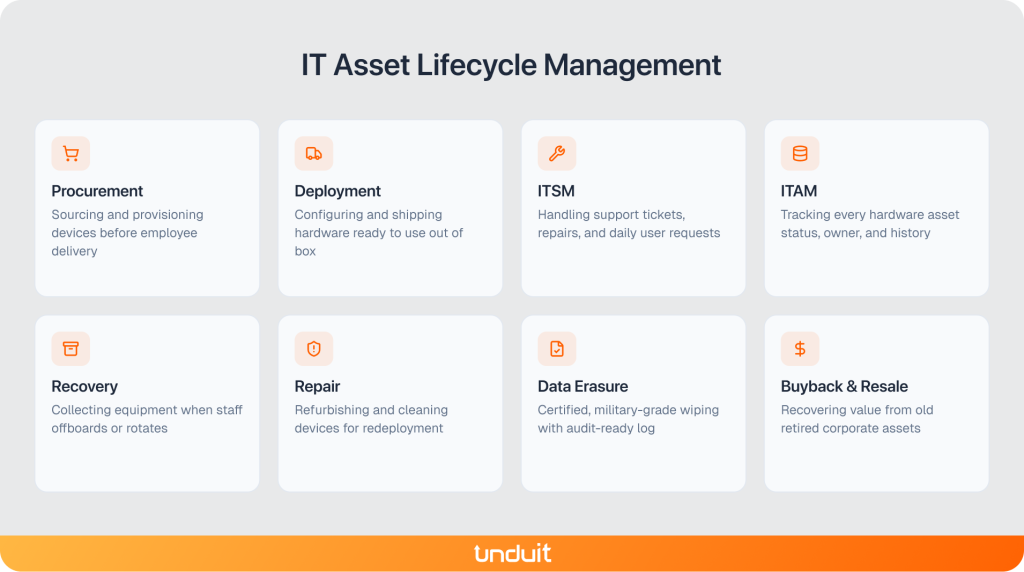
Data erasure works best when it isn’t a separate step handled by a different vendor after the fact. Unduit manages the full IT asset lifecycle on one platform, so erasure happens as part of the same process that’s already tracking the device, not as a handoff outside it. That includes:
- Procurement: Sourcing and provisioning devices before they reach an employee
- Deployment: Configuring and shipping hardware ready to use
- IT service management (ITSM): Handling support tickets and day-to-day issues
- IT asset management (ITAM): Tracking every device’s status, location, and history
- Recovery: Collecting devices when an employee leaves, or hardware is retired
- Repair: Refurbishing devices for redeployment where possible
- Data erasure and certification: Wiping devices to standard and generating audit-ready certificates as part of the asset’s own record
- Buyback and resale: Recovering value from devices that can be resold
- Recycling: Responsibly processing end-of-life hardware, across more than 100 countries
Frequently Asked Questions
Q1: Is deleting a file the same as erasing it?
No. Deleting a file usually just removes the reference to it; the data is often still there until it’s overwritten, which is why recovery software can pull it back.
Q2: Can data be recovered after a DoD wipe?
Not with standard recovery tools, when the method is applied correctly to the right kind of drive. It becomes less reliable on SSDs, where multiple overwrite passes don’t guarantee the same result they do on hard drives.
Q3: What’s the difference between Clear, Purge, and Destroy?
Clear is a basic overwrite suited to lower-risk situations. Purge uses more rigorous methods that resist advanced recovery techniques. Destroy physically disables the device so it can never be read again.
Q4: Do you need to destroy an SSD, or can it be wiped?
In most cases, an SSD can be wiped using its built-in secure erase command or cryptographic erasure, without needing physical destruction. Destruction is usually reserved for drives that are damaged or hold data too sensitive to risk reuse.
Q5: How many times should you wipe a hard drive?
For a traditional hard drive, a single pass following NIST 800-88 Purge guidance is generally considered sufficient. Multiple-pass methods like DoD’s three- or seven-pass overwrite aren’t necessary for most modern hard drives, and add no real benefit on SSDs.