The rise of remote work and Bring Your Own Device (BYOD) trends has reshaped how businesses operate. While this flexibility boosts productivity, it also opens the door to cyber threats.
Mobile Device Management (MDM) is the solution businesses need to protect corporate data and manage devices remotely.
Key Takeaways
- Secure all devices remotely with centralized MDM controls.
- Prevent data breaches and stay compliant with regulations.
- Boost productivity via streamlined app management and AI support.
- Manage mixed platforms with scalable, cross-device security.
MDM reduces data breach risks by enforcing encryption and enabling remote wipes. It’s essential for managing devices like smartphones, tablets, and laptops securely.
What is MDM?
Mobile Device Management (MDM) is software that helps organizations manage, secure, and monitor mobile devices.
Key functionalities include:
- Device tracking
- App deployment
- Password enforcement
- Remote lock or wipe
MDM is a security solution that’s evolved from SIM-based systems to cloud-native platforms, making it scalable and flexible.
Unlock Seamless Mobile Device Management with Unduit.
Discover how IT Teams Across the Globe Use our platform for their MDM Needs.
Book a Demo!How MDM Works
Mobile Device Management (MDM) works as a central control system that allows IT administrators to manage, secure, and monitor devices remotely. At its core, MDM connects the organization’s devices, smartphones, tablets, laptops, and desktops to a management console, which acts as the hub for policy enforcement, monitoring, and updates.
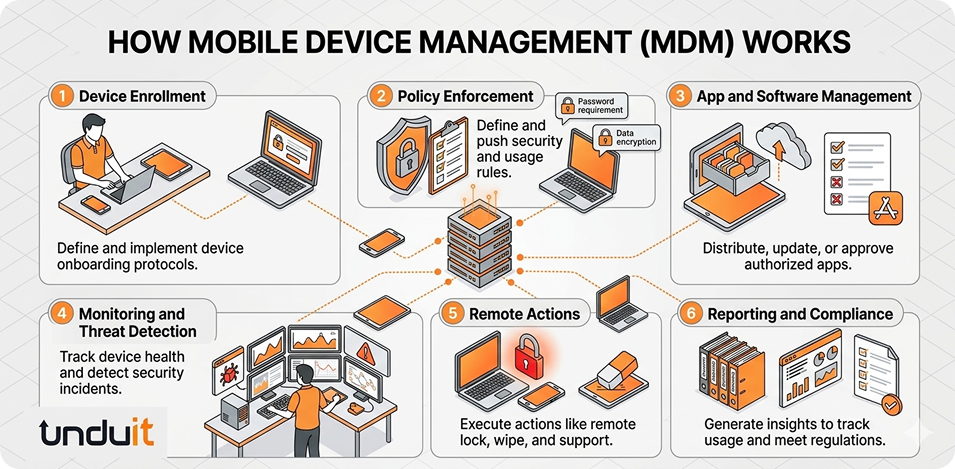
Here’s a step-by-step look at how it operates:
1. Device Enrollment
The first step is enrolling devices into the MDM system. Depending on the platform:
- iOS/iPadOS devices use Apple Business Manager or Apple School Manager for automated enrollment.
- Android devices can enroll via zero-touch provisioning or QR codes.
- Windows devices leverage Windows Autopilot. Once enrolled, the MDM agent or app is installed on the device, creating a secure communication channel with the management console.
2. Policy Enforcement
MDM allows IT admins to define security and usage policies for all enrolled devices. Policies can include:
- Password complexity and expiration rules
- Encryption requirements
- Restrictions on app installation or device features
- Content filtering and safe browsing rules
These policies are automatically pushed to devices, ensuring consistent security across the organization.
3. App and Software Management
MDM solutions provide tools for deploying, updating, and managing apps across the organization. Admins can:
- Approve or blacklist applications
- Push updates remotely
- Ensure only business-approved apps are installed
This reduces the risk of malware and keeps devices compliant with corporate standards.
4. Monitoring and Threat Detection
MDM continuously monitors enrolled devices for compliance and security issues. Key features include:
- Real-time device location tracking
- Detection of jailbroken or rooted devices
- Alerts for unusual activity or potential threats
Integrated threat defense helps identify malware, phishing attacks, and other vulnerabilities before they impact the organization.
5. Remote Actions
When a device is lost, stolen, or compromised, MDM enables immediate remote actions:
- Remote lock to prevent unauthorized access
- Remote wipe to delete sensitive data
- Troubleshooting through remote support tools
These actions protect corporate data and minimize the risk of breaches.
6. Reporting and Compliance
MDM platforms generate reports and dashboards that provide visibility into device usage, compliance status, and security incidents. This ensures organizations can:
- Maintain regulatory compliance (GDPR, HIPAA, PCI DSS)
- Track device lifecycle from onboarding to retirement
- Make informed decisions about IT resources and asset management
MDM for Major Platforms
Different platforms have unique needs when it comes to mobile device management. Let’s explore the capabilities of MDM for some of the most commonly used operating systems:
| Platform | Key Features |
|---|---|
| iOS/iPadOS | Automated enrollment via Apple Business Manager, kiosk mode, content filtering, BYOD privacy controls |
| Android | App management, geofencing, open-source options for private networks |
| Windows | Patch management, Entra ID integration, remote troubleshooting |
| macOS | APNs-based policy push, app distribution, security benchmarks |
These MDM platforms ensure that your organization’s devices, regardless of the operating system, can be managed and secured consistently across your entire fleet. For businesses with mixed-device environments, selecting the right MDM solution for your specific needs is essential.
Key Features of MDM
MDM solutions offer a wide range of essential features to streamline mobile device management:
- Remote Visibility and Monitoring: IT admins can remotely monitor and manage devices, ensuring that any potential security threats are identified and mitigated quickly.
- App Whitelisting: By enforcing app whitelisting, MDM ensures that only approved apps can be installed, reducing the risk of malicious software infiltrating your devices.
- Data Encryption: MDM solutions enforce encryption protocols to ensure that sensitive data stored on mobile devices is protected from unauthorized access.
- Threat Defense: Integrated threat defense capabilities help protect against malware, phishing attacks, and other common threats that target mobile devices.
- Compliance Auditing: Regular auditing helps organizations maintain compliance with regulations like GDPR, HIPAA, and PCI DSS, reducing the risk of costly fines and penalties.
MDM dashboards provide a unified view of all connected devices, making it easier to track device lifecycles from onboarding to retirement. Additionally, integration with Identity Access Management (IAM) and Single Sign-On (SSO) systems further enhances operational efficiency by streamlining user access controls.
Benefits for Businesses
The advantages of implementing an MDM solution go far beyond just securing devices. Imagine your employee loses their Laptop at a café… here’s how MDM saves the day:
- Enhanced Security: By enforcing strong password policies, enabling encryption, and offering remote wipe capabilities, MDM significantly mitigates the risk of data breaches due to lost or stolen devices.
- Increased Productivity: MDM solutions help maintain a distraction-free work environment by ensuring that only necessary apps are accessible, while also enabling remote support when employees encounter technical issues.
- Cost Savings: By optimizing IT resources and streamlining device management, MDM helps businesses save costs while making better use of existing hardware.
- Regulatory Compliance: MDM ensures that mobile devices remain compliant with regulatory requirements, preventing costly non-compliance penalties and safeguarding customer data.
Moreover, mobile device management plays a crucial role in IT asset management, helping organizations track and manage mobile devices throughout their lifecycle from procurement to retirement.
Why MDM is Essential for Secure Mobility
In today’s digital-first world, securing mobile devices is critical. MDM ensures that all devices, from iPhones to Windows laptops, are properly managed and secure.
Key reasons why MDM is essential:
- Comprehensive protection across all devices
- Remote management for a flexible workforce
- Seamless scalability as your business grows
Implementing the right MDM solution helps your business stay secure, compliant, and efficient in an increasingly mobile world.
How Unduit’s AI Driven IT Agent Enhances MDM
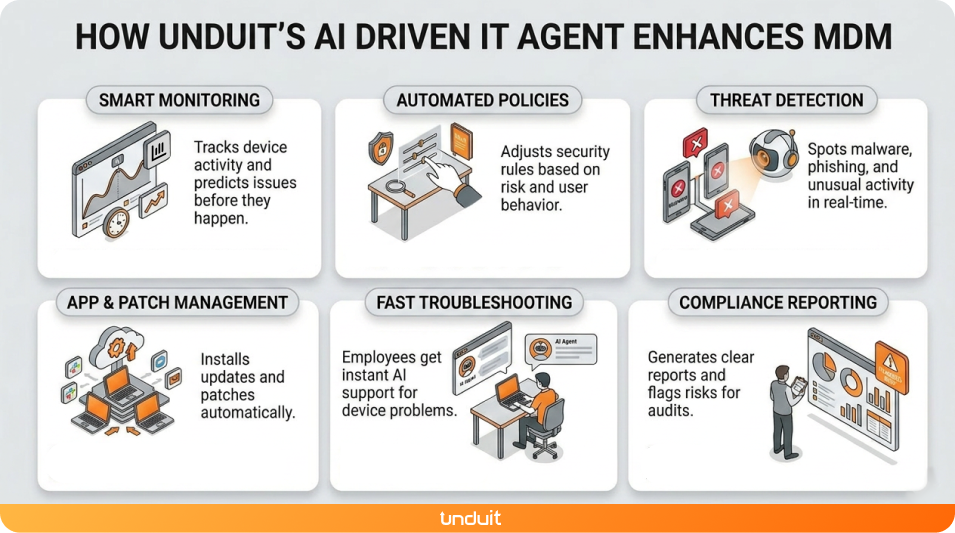
While traditional MDM handles device management and security, Unduit’s AI driven IT agent takes it a step further by automating and optimizing IT operations across your mobile ecosystem. Here’s how it helps:
- Smart Monitoring: Tracks device activity and predicts issues before they happen.
- Automated Policies: Adjusts security rules based on risk and user behavior.
- Threat Detection: Spots malware, phishing, and unusual activity in real-time.
- App & Patch Management: Installs updates and patches automatically.
- Fast Troubleshooting: Employees get instant AI support for device problems.
- Compliance Reporting: Generates clear reports and flags risks for audits.
Unduit transforms traditional MDM from a reactive tool into a proactive, AI-powered IT assistant improving security, boosting efficiency, and reducing IT workload. By combining MDM with AI intelligence, businesses can manage devices smarter, safer, and faster.
FAQs
Q1: What is mobile device management software?
Mobile Device Management (MDM) software is a tool that allows organizations to manage, secure, and monitor mobile devices such as smartphones, tablets, and laptops, ensuring devices comply with company policies and protecting corporate data.
Q2: What is the purpose of mobile device management (MDM) software?
The purpose of MDM software is to protect corporate data, enforce security policies, and simplify device management by allowing IT teams to monitor devices, deploy apps, enforce encryption, and remotely lock or wipe devices if necessary.
Q3: What does MDM software do?
MDM software tracks device location, enforces password and encryption policies, installs and updates apps remotely, detects and prevents security threats, and supports remote troubleshooting and device wipe.
Q4: How much does MDM software cost?
MDM software costs vary by vendor and device count, typically ranging from $2–$6 per device per month for small businesses and $5–$12 per device per month for enterprises, with some vendors offering free limited plans or open-source solutions.
Q5 : What features should I look for in MDM software?
Important features include device enrollment and tracking, app deployment and whitelisting, password and encryption enforcement, remote lock, wipe, and troubleshooting, threat detection and compliance auditing, and integration with IAM or SSO systems.